LOcal Network for Telemetry, Remote monitoring & Automation
Your LoRaWAN® sensors, straight into Home Assistant
LONTRA is a LoRaWAN® gateway with a built-in network server. It receives the data from your sensors,
decodes it and publishes it to Home Assistant over MQTT. Sensors show up on their own, with no programming
and without your data ever leaving your home.
0external servers between your sensors and Home Assistant
100%local processing
5 yearsof security updates, at least
Use cases
What can you do with LONTRA?
Wherever Wi-Fi does not reach or there is no power socket nearby, a battery-powered LoRaWAN® sensor tells you what is going on. Some examples:
Holiday home
Sensors in the kitchen, bathrooms, doors and garden: if there is a leak, a frost or an open door, Home Assistant notifies your phone even when you are not there.
Water leaksTemperatureDoor opening
Wells and tanks
Check the level of your water or heating-oil tank without going there, even if it is at the far end of the property.
LevelDistancePressure
Vegetable patch and garden
Measure soil moisture and let Home Assistant water only when it is needed.
Soil moistureRainIrrigation
Garage, storage room and basement
Flooding, damp or the garage door left open, in those corners Wi-Fi cannot reach.
FloodingHumidityDoors
Energy and consumption
Measure what your appliances use or read your water and electricity meters to spot waste and leaks.
Smart plugsMetersConsumption
SMEs and warehouses
Get an alarm if a cold room warms up, and monitor CO₂ and occupancy in offices and meeting rooms.
Cold chainCO₂Occupancy
And when something happens, Home Assistant notifies your phone or runs whatever automation you choose.
LoRaWAN®
Why LoRaWAN®
Wi-Fi, Zigbee or Bluetooth fall short when the sensor is far away, behind thick walls or with no power socket nearby.
LoRaWAN® is designed precisely for that: small messages, over long distances, with minimal power consumption.
Long rangeCovers a large house, an estate or a warehouse from a single point: from hundreds of metres indoors to several kilometres in open field.
Goes through walls and floorsThe 868 MHz band penetrates walls, floor slabs and basements. Garages, storage rooms, wells or meters are no longer a problem.
Years on the same batterySensors transmit for milliseconds and sleep the rest of the time: many run for years without a battery change.
Keeps your Wi-Fi freeIt uses its own radio band, away from the 2.4 GHz used by Wi-Fi, Zigbee and Bluetooth. No interference, no congested networks.
Encryption built inEach sensor encrypts its data with AES-128 and its own keys, as defined by the LoRaWAN® standard.
Open standardHundreds of sensors from different manufacturers: temperature, humidity, CO₂, door opening, water leaks, smart plugs, meters…
Local integration
Everything happens at home
Many LoRaWAN® solutions send the data to a cloud server and from there to your home automation.
LONTRA has the network server inside: data goes from the sensor to your Home Assistant without leaving your local network.
No cloud, no subscriptions. No accounts on external services and no fees.
Keeps working without Internet. It only connects to check for updates and download decoders from the Embed-IoT catalogue.
Auto-discovery in Home Assistant. Thanks to MQTT Discovery, each sensor appears with its entities already created.
Two-way control. Send commands to your sensors (downlinks) from your automations.
Your local network
Sensors
LoRaWAN®
LONTRA
MQTT
Home Assistant
No external server between your sensors and Home Assistant
From the box to Home Assistant in four steps
No command line and no configuration files: everything is done from the device's web panel.
1
Connect
USB-C power and a network cable, or Wi-Fi set up from its access point.
2
Link to Home Assistant
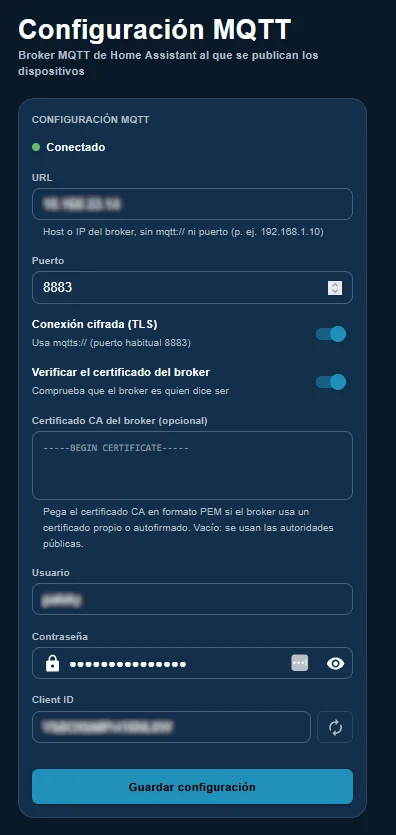
Enter the address of your MQTT broker, with TLS encryption if you wish.
3
Add your sensors
Enter the DevEUI and keys, and pick the model from the decoder catalogue.
4
Done
The sensor appears automatically in Home Assistant with all its entities.
Web panel
Everything under control, from your browser
LONTRA includes its own web panel, available in 10 languages, to manage your sensors, the network and the connection to Home Assistant.
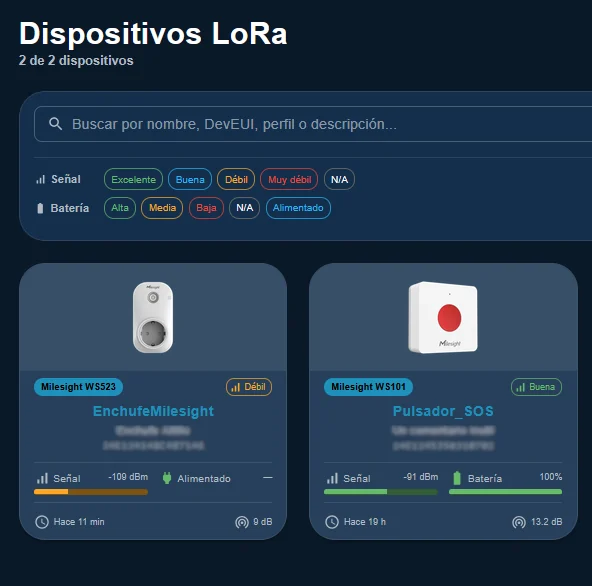
Your devices at a glance
As cards or as a table, with the signal, battery and last reading of each sensor. Search and filter in seconds.
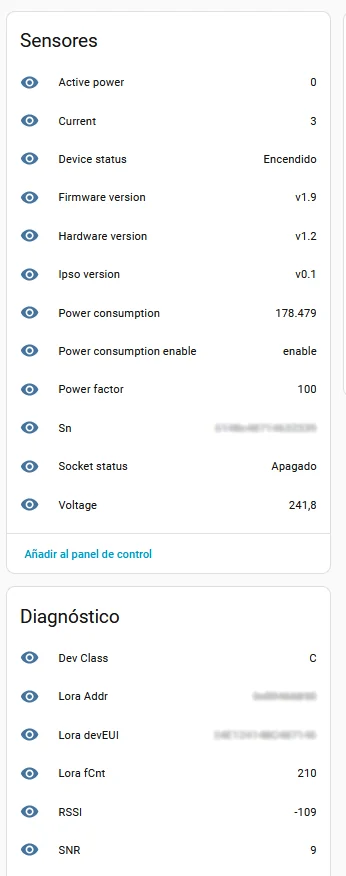
Straight into Home Assistant
Each sensor arrives with its measurement and diagnostic entities (RSSI, SNR, class…), ready for your dashboards and automations.
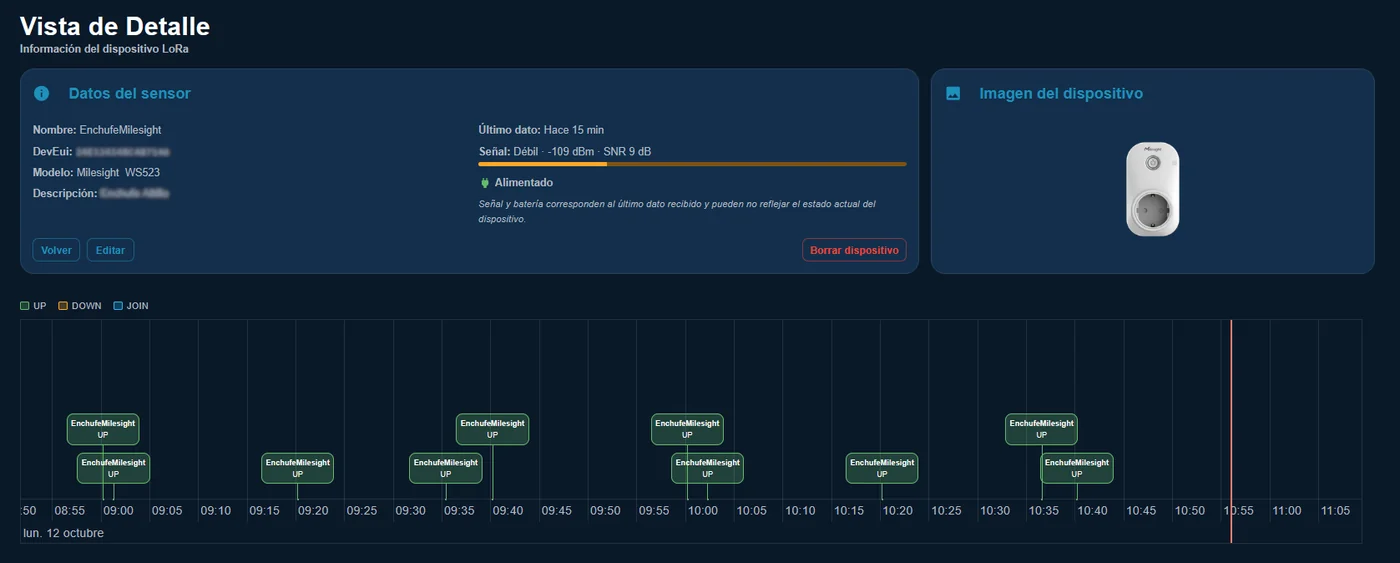
Detail and timeline
Check the signal quality and activity of each sensor. Click any event to see the decoded frame.
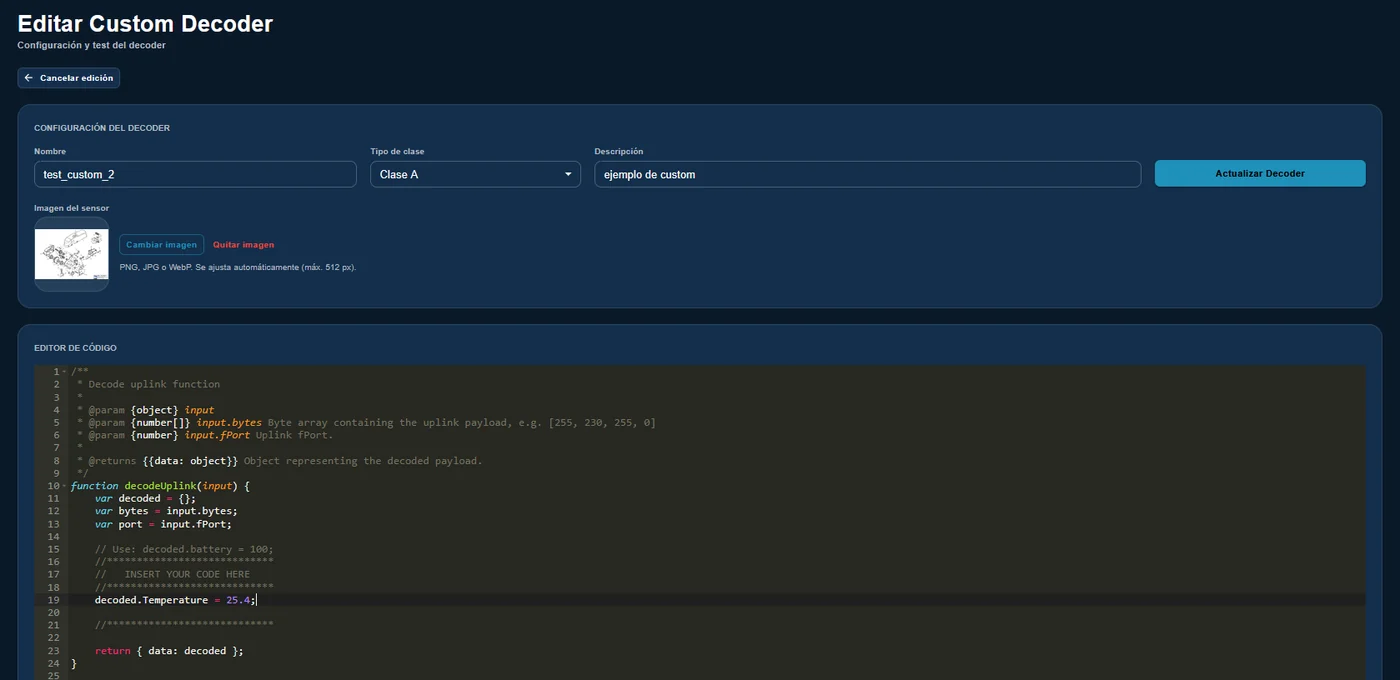
Decoder catalogue and your own decoders
A catalogue of decoders for commercial sensors, downloaded from Embed-IoT. A custom sensor?
Write your own decoder in JavaScript and test it from the same editor.
Security
Secure by design and maintained over time
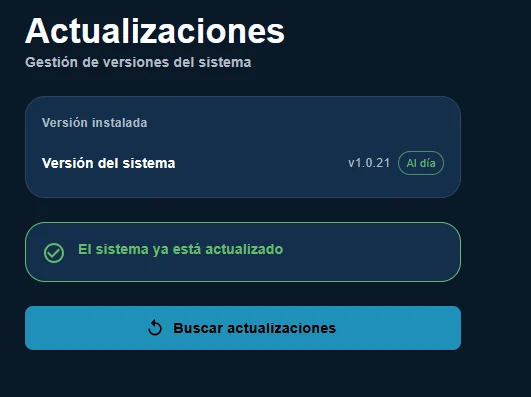
Signed updates installed from the panel itself, plus automatic security patches for the operating system.
5 years of security updates at least, from the date each unit is placed on the market.
Encrypted MQTT (TLS) with broker certificate verification.
Two-step verification (2FA) and mandatory change of the factory password.
There are other ways to bring LoRaWAN® sensors into Home Assistant. This is how they compare:
LONTRA
Gateway + cloud server
DIY setup (Raspberry Pi + network server)
Where your data is processed
At home
On external servers
At home
Works without Internet
Yes
No
Yes
Accounts and fees
None
Account required; free with limits or paid
None
Home Assistant integration
Automatic (MQTT Discovery)
Manual, sensor by sensor
Manual: MQTT and templates
Setup
Minutes, from your browser
Register gateway and sensors on the service's website
Hours: OS, network server, forwarder, MQTT…
Sensor decoders
Ready-made catalogue + built-in editor
Depends on the service
You find and adapt them
Security updates
Signed, from the panel, at least 5 years
The service's; the gateway separately
Up to you
Support
Embed-IoT, in English, Spanish and Catalan
The service's
Forums and community
The device
Compact, rugged and ready to install
Aluminium body
Integrated mounting points
On/Off button (also used to recover access)
USB-C power
RJ45 Ethernet port
LoRaWAN® antenna
Wi-Fi antenna
Technical specifications
Radio
LoRaWAN® EU868 (863–870 MHz) · class A and C sensors
Network server
Built into the device, no external services
Integration
MQTT with Home Assistant MQTT Discovery · optional TLS
Connectivity
RJ45 Ethernet · Wi-Fi · Wi-Fi access point for initial setup
Power
USB-C
Enclosure
Aluminium, with integrated mounting points
Management
Web panel in 10 languages · two-step verification · signed updates
Support
Security updates for at least 5 years
Compatible sensors
Your sensor is probably already in the catalogue
The decoders in the catalogue are already prepared and verified: when you add a sensor, you just pick its model.
+430models ready to use
50manufacturers
Sensor not listed? Any EU868 LoRaWAN® sensor works by writing its decoder in the panel, and the catalogue grows with every update. Tell us which model you use and we will add it.
FAQ
What people ask us most
Do I need an Internet connection?
Not for it to work: data goes from the sensor to your Home Assistant within your local network. The Internet is only used to check for updates and download decoders from the catalogue; without a connection, everything keeps working with what you already have installed.
What do I need in Home Assistant?
An MQTT broker (for example, the Mosquitto add-on) and the MQTT integration enabled. It works with any type of Home Assistant installation that has MQTT.
Can I use it without Home Assistant?
Yes. LONTRA publishes each sensor's readings to an MQTT broker, so Node-RED or other systems that read MQTT can use them. Automatic entity creation is specific to Home Assistant.
Is my sensor compatible?
Any LoRaWAN® sensor for the EU868 band, class A or C. If its model is in the catalogue, you just pick it; if not, you can write your own decoder in JavaScript from the panel. Questions about a specific model? Write to us.
What range does it have?
It depends a lot on the environment: from hundreds of metres indoors, through several walls, to several kilometres in open field with line of sight. Placing the device high up and away from metal surfaces helps a lot.
Are there any fees or subscriptions?
No. The device is yours: no cloud accounts and no recurring payments. Security updates are included for at least 5 years.
What if Embed-IoT ceased to exist?
Because everything runs locally, LONTRA would keep receiving data from your sensors and sending it to Home Assistant. You would only stop receiving updates and new decoders; your own decoders keep working.
When will it go on sale and how much will it cost?
We are finalising the CE certification. Join the waiting list and we will let you know the price and date as soon as it is available.
Coming soon
Be among the first to get it
We are finalising the CE certification of LONTRA. Leave us your name and email and we will let you know as soon as it is on sale.
We will only use your email to tell you about the launch, no advertising. Have a specific project? Write to us.
LONTRA™ is a trademark of Embed-IoT. LoRaWAN® is a registered trademark of the LoRa Alliance. Home Assistant is a trademark of the Open Home Foundation. LONTRA is not affiliated with or endorsed by them.